
Fee Payment via PushCoin (Online)
PushCoin is an online fee payment system to electronically pay school-related fees including lunch balances and registration fees. The District 96 Web Store contains a variety of "a la carte" items for purchase across our schools.
Follow these steps to create and link your account to your student(s).
1. Visit Push Coin Website
2. Sign up as a parent or guardian. Either click on 'I don't have an account' and fill out the form or use an accelerated sign up by clicking on the provided links.
3. Add your student by clicking Add Student and enter the PushCoin code received by email. Repeat for each student.
If you don't have the code, click on “I don’t have a code,” fill out the required fields, and Submit.
Information about the student should appear on the screen.
Verify the information is correct and click Confirm.
Accounts
Each Student has two accounts - parents can transfer funds between the accounts at any time:
Fees account used for registration or participation fees such as athletics.
Parents can deposit as little as $1.00 to pay for fees.
Wallet account used for the webstore, lunch purchases. Items purchased through the webstore can be paid at the time of purchase, without a minimum dollar amount.
Paying For School Fees
When school fees appear on your student's account, you will see a red negative balance under Fees and a red Pay Fees button. You may review them by either clicking Statements or the Pay Fees button.
View Transactions
Click on "Transactions" on the left side of the screen.
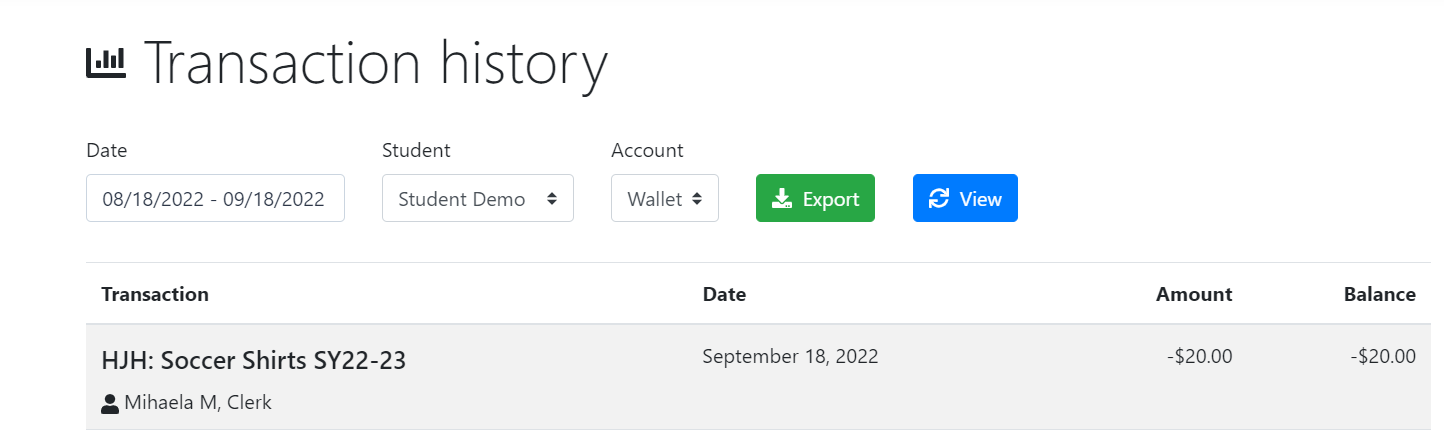
Select the student and the account (wallet or fees) - the screen will refresh to show the purchases made within the dates. Change the dates for transactions outside the most current 30-day range.
Here is an example:
Funding
Set up your payment method by clicking on Accounts and then click on Add Source:
Electronic check (eCheck): The eCheck funding option is always free to use
Credit Card (Visa, MasterCard, Discover): There is an additional fee of 2.9% + $0.28 per transaction to use credit or debit cards. This fee is charged by the card processor (Not PushCoin).
What To Expect When Using PushCoin?
PushCoin.com is a mobile-friendly website. You can use a smartphone or a tablet to pay for school fees or fund and monitor your students' wallet account. The site will adjust to your device’s screen and act like an APP.
If funding electronically, the minimum transaction for the wallet is $35. This minimum exists to allow your school district to keep eCheck transactions free of service charges, and keep the credit card charge to a minimum. There is no minimum transaction amount when funding by physical check.
If you have an outstanding balance in your student’s Fees account, you will be sent an electronic invoice once a month.
Optional programs or items are available on our website through the Webstore Icon (the shopping cart) or by Visiting Riverside School District 96. There is no need to fund student’s wallet to make purchases on the District 96 webstore or pay for student’s fees.
Free Or Reduced Fees
A child’s eligibility status of receiving free or reduced discounts is determined via the National School Lunch Program (NSLP). These statuses are maintained within PowerSchool. This information is carried-over into PushCoin as part of the nightly update. Discounting of fees and web store items are automatically calculated within PushCoin based on a child’s NSLP status.
Accessing PushCoin & Web Store (shopping cart icon):
Access PushCoin here or from the collapsible menu on the homepage's right side
Process Changes
Given the changes in online fee payment systems, there are also changes to some District 96 processes and practices. Here are some important changes relevant to District 96 parents and guardians:
All registration fees and any outstanding balances associated with returning students will be applied to PushCoin accounts.
If a parent or guardian does not wish to utilize the PushCoin online fee payment system, fees can be paid via cash or check in-person at the District 96 Administrative Offices located at 3340 S. Harlem Ave. in Riverside.
Support
If you have questions about your account, contact the Business Office at Email Accounts Receivable.
Refund Policy
Full refunds will be provided on paid registrations for any student who withdraws from Riverside School District 96 prior to their first day of attendance. Prorated refunds will be issued up until the end of the First Trimester of the school year.
For graduating 8th graders or students moving out of the district, refunds will be automatically granted if the balance is more than $10.00. Other refunds must be requested via email to accountspayable@district96.org. If the student has younger siblings enrolled in the next school year, after the last day of school the district office will transfer the funds to the oldest sibling remaining in the district. Otherwise, a refund check will be mailed to the permanent address listed on the student’s file. No cash refunds will be issued. Families can also transfer funds to another family member through their PushCoin account. The district will not issue end-of-year refunds for continuing students (i.e. money in wallets at the end of the school year). All funds will remain in accounts until the next school year.